Grow your
Illustrator skills
With courses, live Q&A, and a creative community supporting artists at every level.

“My first challenge win on Minted was for a pattern I created using the techniques I learned from your course. Your ability to teach and vast knowledge of Illustrator is unmatched!”
- Cavell Ferguson, Artist & Designer

Tour the Community with Laura
What’s Inside the Membership:

Self-Paced Courses
8 amazing courses (a $700 value), including the Heart of Illustrator, are perfect for learning Illustrator from the start or boosting your skills.

Live Sessions and Q&A
Twice monthly, we meet on Zoom for recorded Illustrator technique demonstrations, guest presentations, and Q&A. On alternating weeks, we meet for Drop-in Office Hours, an informal chat with members about what you’re working on and discovering in Illustrator.

Searchable Replay Library
Members get access to all Zoom recordings. The library includes sessions on tools and techniques, new features, draw-along exercises, and much more. Just type a term in the search box to find a tutorial and learn something new.

A Community of Learners
Stand-alone courses can feel static, and cohort courses may not fit your schedule. I’ve created a flexible learning community that’s here for you when you need a boost on your Illustrator art-making journey.
Sound familiar?
• I spend more time searching YouTube than actually learning Illustrator.
• I'm all about Photoshop, and Illustrator never quite clicked.
• I make real progress, then forget how I did it a month later.
• I love learning at my own pace, but I still get stuck and need someone to ask.
• Illustrator changes constantly, and I can't keep up with what's new.
I built this community especially for you. Search for a topic you need, and you'll find lessons, Zoom replays, and helpful comment threads, all in one place. Bookmark what you want to come back to, so you're never hunting for it again.
The Heart of Illustrator course gives you a clear starting point, so you're not guessing what to tackle first in Illustrator. I explain the why behind every step, to help you develop the vector art mindset. If you get stuck, ask me in the comments, I’m there to help you.
Twice-monthly Zoom sessions keep you learning new techniques. Office hours run in between, for whatever you're working on that week.
You don't have to figure this out alone!
Next Live Dates

Pathfinder and Art-Building Tips
Making Brushes
File Handoff Print Checklist
Fresco to Illustrator Vector Tips
Recent Topics
I meet with members to answer questions, give special demos, and keep you motivated. Too busy to attend? Post your question, and I’ll cover it in the Q&A.

Choose Your Plan
Same full access for all plans. Choose how you want to pay, and save when you subscribe for longer!
Monthly
$36/month
Give it a try & tune up your skills!
Quarterly
$96/quarter
$32/mo billed quarterly
Save $84/year
Annual
$300/year
$25/mo billed annually
Best Value • Save $132/year
Included: Self-Paced Courses
-

The Heart of Illustrator
Your foundation for learning Illustrator. Perfect for beginners and anyone who wants a fresh start!
6 hours
-

Illustrator Artistry
Add beautiful textures to your designs! Learn techniques for using images, Adobe Fresco, Adobe Capture, and more.
3 hours
-

The iPad Collection
Learn how to create vector art on the go with tutorials for Illustrator on the iPad and Adobe Fresco.
2.5 hours
-

Art Brush Workflows
Imagine your linework more organic and less illustrator-y. Creative projects and free brushes included.
3 hours
-

Exploring Color
Get creative with buttery-smooth gradients and newer features like Generative Recolor.
1 hour
-

Recolor Artwork
A secret weapon for all designers – quickly apply and refine color while developing endless palettes.
1.5 hours
-
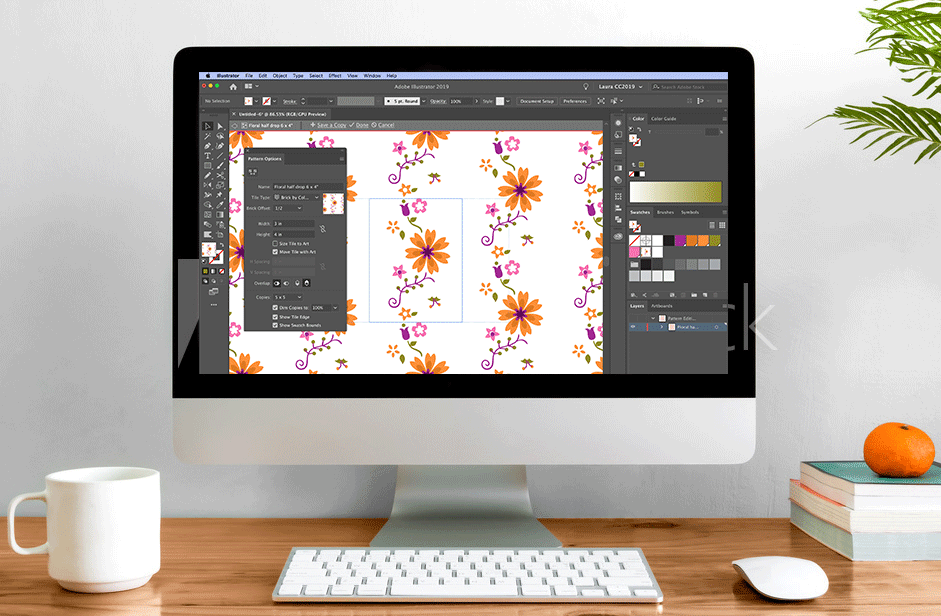
Pattern Power
Understand the Pattern Editing Mode feature and let your creativity shine. A truly comprehensive course.
3 hours
-

Learn the Pen Tool
A step-by-step process for developing Pen Tool skills with a series of drawing projects in Adobe Illustrator.
1.75 hours
Questions?
-
Actually, both! The Heart of Illustrator course is perfect for beginners (or a basic skills refresh), and the other courses assume you are at the intermediate level. The live sessions cater to all skill levels, depending on Laura’s topic and member questions.
-
This is a subscription-based membership. You will have access to the courses, live and recorded zoom calls, and the community for the length of your subscription plan. You will be charged on a recurring basis (monthly, quarterly, or annually, depending on which plan you choose) until you cancel. You may cancel the automatic renewal of your subscription at any time via your account management page in Circle.
-
Monthly and Quarterly subscriptions are non-refundable. You may cancel the automatic renewal at any time from your account page, and maintain your access for the remainder of your subscription period. Annual subscriptions are refundable up to 30 days from the date of purchase. No refunds on annual plans are given after 30 days.
-
Yes! you can change your subscription plan inside your account at any time. If you need to take a break, you can cancel and resubscribe later without losing your member profile.
Ready to take your Adobe Illustrator skills to the next level?